Skip to content
veldor
All products

CLEA

An AI scheduling assistant for cleaning companies.

When a cleaner calls in sick, ask CLEA who can cover. It checks the team’s schedule, shows which visits would change and gives you a plan to review.

Explore the walkthrough

Cover a sick day.

Start with the same question you’d ask a dispatcher. Write to CLEA in English or Spanish and pick up the conversation where you left off.

  1. Find the affected visits

    CLEA looks up the absent cleaner’s assignments, shifts and customer requirements. For Sophie’s morning clean, it checks who is working, who can do the job and who can get there after their previous stop.

  2. Compare the alternatives

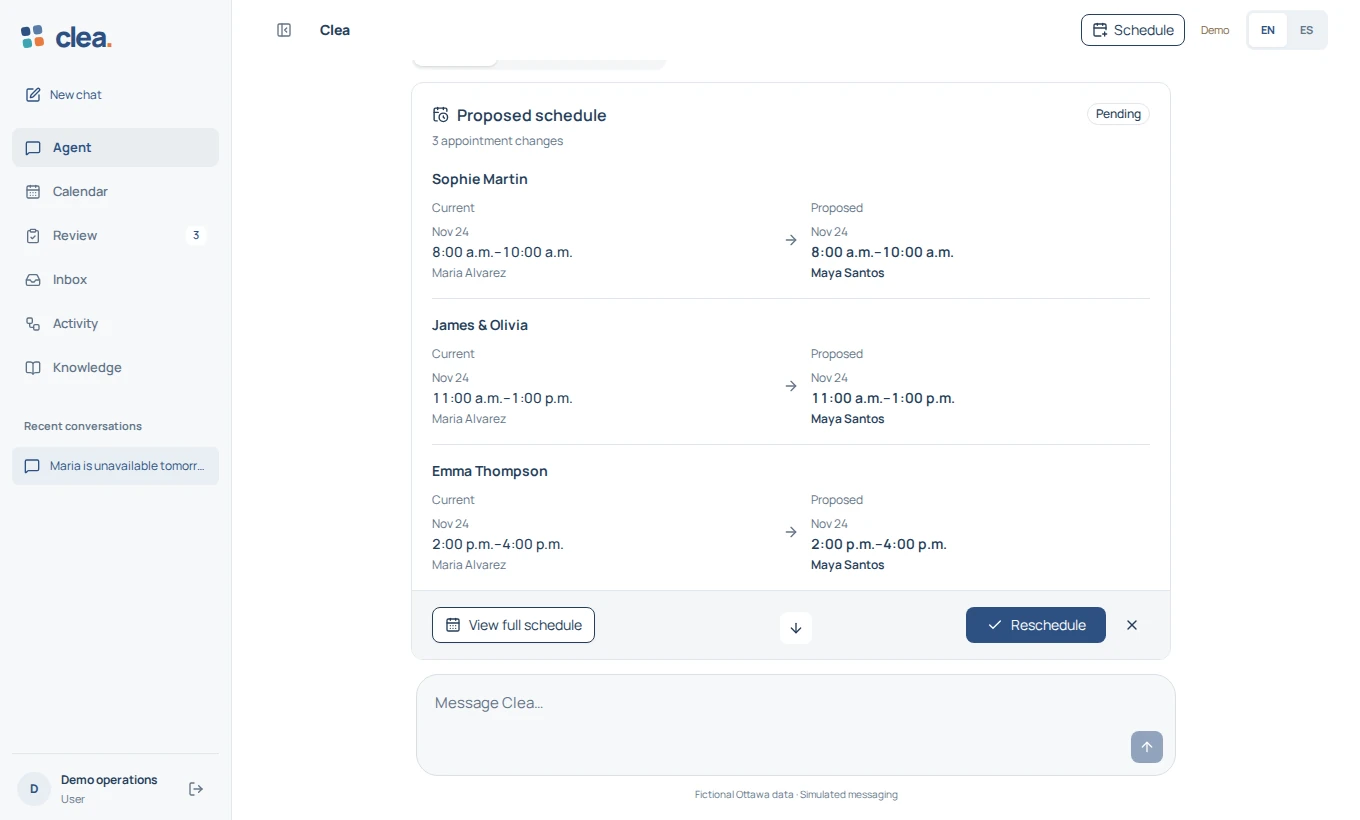
    See the current and proposed time and team for each visit. The scheduling engine checks staffing, required pairs, working hours, overlaps, travel time and customer arrival windows. Open the full schedule to see the effect on the rest of the day.

  3. Decide what changes

    If an alternative moves a customer’s visit time, confirm it with them where required. Choose the proposal and select Reschedule. CLEA rechecks the plan at approval. When the cleaner returns, you can ask it to restore the original assignments and review that plan too.

Bookings and preferences.

Book a cleaning

“Find a time for Sophie next Tuesday.”

CLEA looks up the customer and their usual visit length. If a detail is missing, it asks you. Review the proposed time, duration and team, then select Schedule. The booking form is also available when you already know the details.

Remember a preference

“Remember that Sophie prefers Maria.”

CLEA drafts a rule you can read and approve. Once approved, the scheduler considers Sophie’s preference on future visits alongside availability and staffing requirements. You can correct or remove the rule in Knowledge.

Inside HQ.

The office can see who’s working, what needs a decision and which messages have reached the team.

Calendar & review
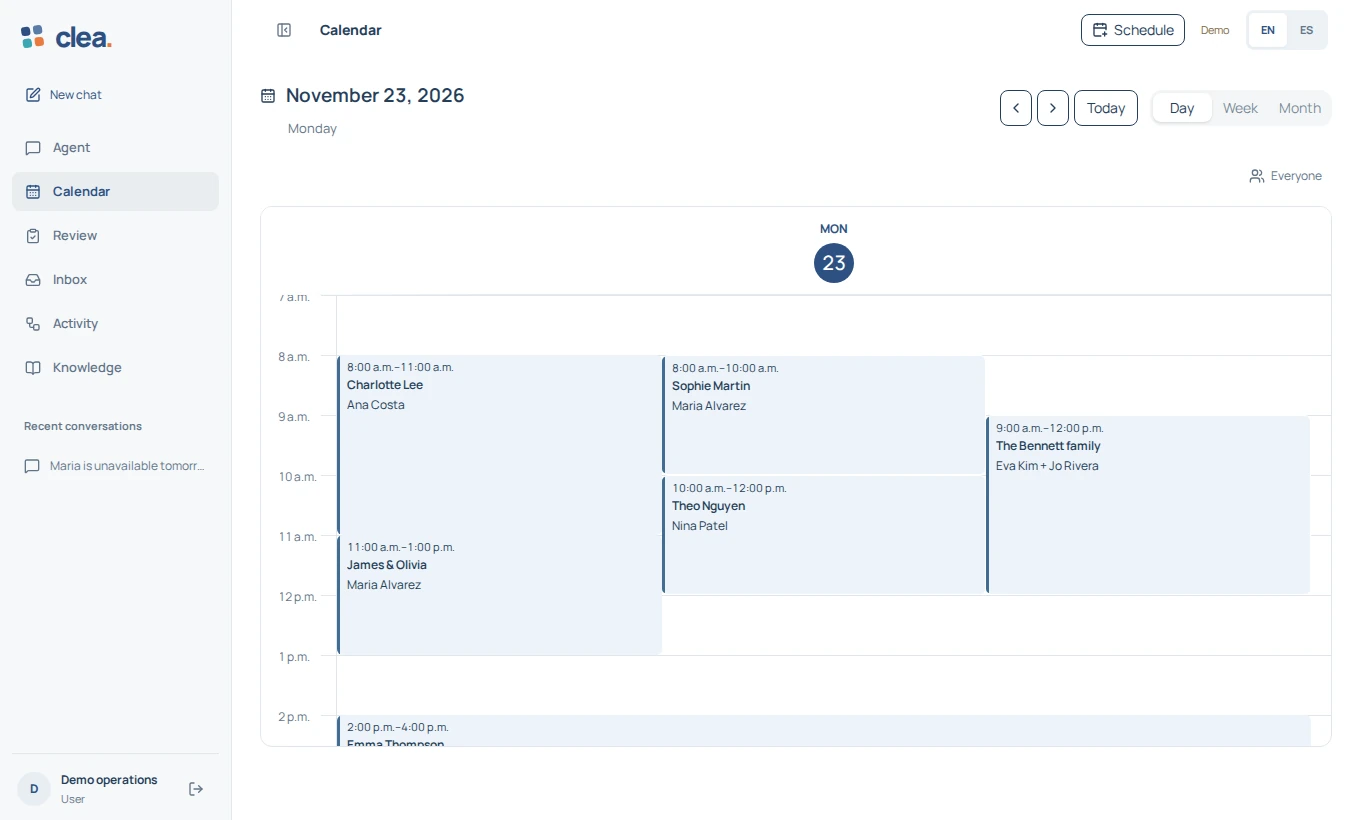
Scan a day, week or month for the whole team, or filter down to one cleaner. A paired visit appears once with both cleaners. Open a visit for its details, then use Review to compare pending proposals with the calendar.
Customer messages
When a customer texts a last-minute instruction, CLEA matches it to the visit and the assigned cleaner. Cancellations and unclear requests go to the office for review. Cleaners get a private, one-way inbox. Sensitive entry instructions are reserved for the visit, and the customer’s phone number stays out of the cleaner view.
Reminders & confirmations
Prepare booking confirmations, schedule updates and appointment reminders in English or Spanish. Managers review drafts or approve a sending policy. External delivery checks consent, opt-outs, approved templates and business hours.
People & knowledge
Keep client and cleaner records alongside arrival windows, service durations, pairings and preferences. Add people, correct a rule or retire an old one. CLEA checks for upcoming visits before you remove someone.
Activity & administration
Follow an update from approval through its delivery attempts in Activity. Administrators can manage integrations, inspect the full audit history, retry due jobs and review the AI requests and tool results for their own conversations.
Cleaning visits on the office calendar, with a time and a cleaner listed on each appointment.
The team calendar
CLEA proposes moving three visits from Maria to Maya. The current and proposed start times match for each visit.
Reviewing a change before rescheduling
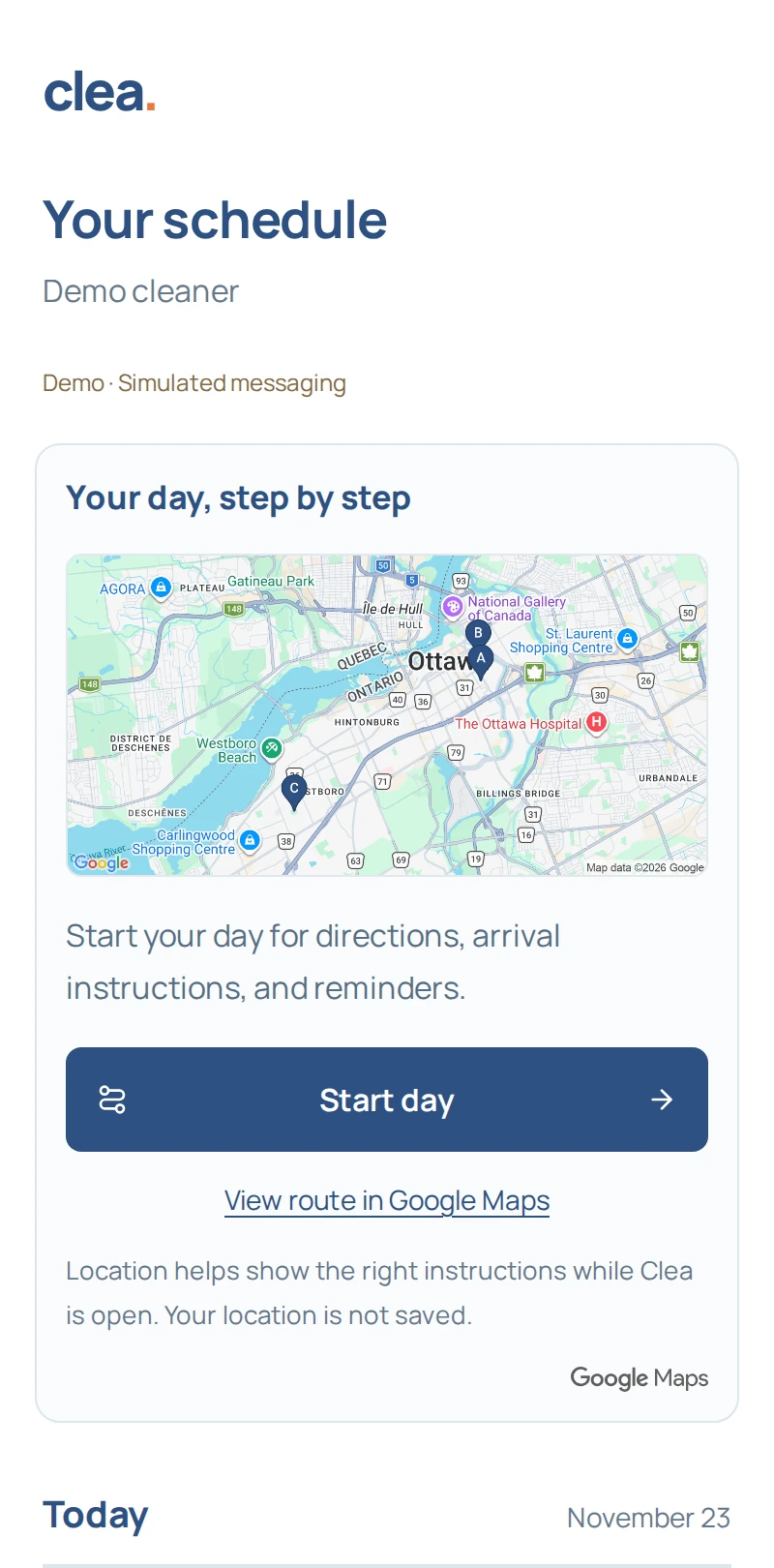
A cleaner’s mobile route map with three stops, a Start day button and a link to Google Maps.
The cleaner’s mobile schedule

The cleaner’s day.

Each cleaner sees their own visits on one mobile page, in English or Spanish.

Before the first stop
Check today’s route, upcoming visits and individual start times. Open a stop in Google Maps for directions.
At the house
Tap Start day to turn on workday guidance. A fresh location check while the app is open unlocks instructions for the assigned visit. Raw location fixes are never stored.
On to the next visit
Optional reminders flag when to wrap up or leave for the next stop. Finish visit advances the cleaner’s personal progress. End day switches off guidance and workday reminders.

Demo and live setup.

Book a walkthrough

In the demonstration, try the full approval flow with fictional customers and cleaners. Approving a booking or reschedule updates the demo calendar and cleaner inbox. External message delivery is simulated.

With a live team, CLEA reads mapped records from Notion. Managers review proposed changes in CLEA and apply them in Notion. Customer SMS and cleaner notifications through SMS or WhatsApp require configured providers, recipient consent and approved messaging policies.

Access follows the role. Operators handle daily scheduling and reviews, administrators manage setup, and viewers have read-only access. Cleaners see their own assignments. CLEA keeps household access details, full addresses and phone numbers out of the scheduling information it sends to the model.
See all products